<?xml version="1.0" encoding="UTF-8"?>
<rss  xmlns:atom="http://www.w3.org/2005/Atom" 
      xmlns:media="http://search.yahoo.com/mrss/" 
      xmlns:content="http://purl.org/rss/1.0/modules/content/" 
      xmlns:dc="http://purl.org/dc/elements/1.1/" 
      version="2.0">
<channel>
<title>Pratik Ingle</title>
<link>https://pratik-ingle.github.io/blog.html</link>
<atom:link href="https://pratik-ingle.github.io/blog.xml" rel="self" type="application/rss+xml"/>
<description>Research explanations, learning notes, and tutorials.</description>
<generator>quarto-1.0.37</generator>
<lastBuildDate>Tue, 28 Jul 2026 22:00:00 GMT</lastBuildDate>
<item>
  <title>Simulating a Tactile Sensor in MuJoCo</title>
  <link>https://pratik-ingle.github.io/posts/learning/mujoco-tactile-sensor-simulation/index.html</link>
  <description><![CDATA[ 


<p>One part of my UCL visit is about replicating a 3-channel tactile sensor in MuJoCo for data collection and training. The goal is not to build a perfect copy of the real sensor. The goal is to create a simulation that produces useful tactile structure for learning.</p>
<section id="what-needs-to-be-simulated" class="level2">
<h2 class="anchored" data-anchor-id="what-needs-to-be-simulated">What needs to be simulated</h2>
<p>A useful tactile simulation needs at least:</p>
<ul>
<li>Contact location across the sensor surface.</li>
<li>Normal force at contact points.</li>
<li>Shear forces in two lateral directions.</li>
<li>Temporal changes as objects move, slip, or press into the surface.</li>
</ul>
<p>The difficult part is matching the signal statistics closely enough that models trained on simulation learn transferable structure.</p>
</section>
<section id="the-modeling-tradeoff" class="level2">
<h2 class="anchored" data-anchor-id="the-modeling-tradeoff">The modeling tradeoff</h2>
<p>A high-fidelity tactile simulation can become expensive quickly. But a very simple proxy may miss the contact cues needed for downstream tasks. The practical question is where the approximation should live.</p>
<p>For representation learning, it may be enough for the simulation to capture the relationships between contact, shape, and force dynamics, even if every taxel is not physically perfect.</p>
</section>
<section id="data-collection-loop" class="level2">
<h2 class="anchored" data-anchor-id="data-collection-loop">Data collection loop</h2>
<p>The imagined loop is:</p>
<ol type="1">
<li>Sample objects, poses, and interactions in simulation.</li>
<li>Record normal and shear force maps over time.</li>
<li>Train MAE/JEPA-style models on the generated tactile streams.</li>
<li>Test whether the learned representation transfers to real tactile data.</li>
</ol>
</section>
<section id="open-questions" class="level2">
<h2 class="anchored" data-anchor-id="open-questions">Open questions</h2>
<ul>
<li>Which contact model best matches the real sensor behavior?</li>
<li>How much domain randomization is useful?</li>
<li>Should the network see raw forces or preprocessed tactile maps?</li>
<li>What downstream task best measures whether the simulation is good enough?</li>
</ul>


</section>

 ]]></description>
  <category>learning</category>
  <category>simulation</category>
  <category>tactile sensing</category>
  <category>MuJoCo</category>
  <guid>https://pratik-ingle.github.io/posts/learning/mujoco-tactile-sensor-simulation/index.html</guid>
  <pubDate>Tue, 28 Jul 2026 22:00:00 GMT</pubDate>
</item>
<item>
  <title>Normal and Shear Forces in Tactile Sensing</title>
  <link>https://pratik-ingle.github.io/posts/learning/tactile-sensing-normal-shear/index.html</link>
  <description><![CDATA[ 


<p>Touch is not just pressure. A tactile sensor can measure how hard an object presses into the surface, but also how contact moves sideways. That sideways information is often the clue that an object is slipping, rotating, or changing contact state.</p>
<section id="three-channels" class="level2">
<h2 class="anchored" data-anchor-id="three-channels">Three channels</h2>
<p>The tactile setup I am learning from uses three force channels:</p>
<ol type="1">
<li>Normal force: how strongly the object presses into the sensor.</li>
<li>Shear-x: lateral force along one sensor axis.</li>
<li>Shear-y: lateral force along the other sensor axis.</li>
</ol>
<p>Together, these channels describe richer contact mechanics than normal force alone.</p>
</section>
<section id="why-shear-matters" class="level2">
<h2 class="anchored" data-anchor-id="why-shear-matters">Why shear matters</h2>
<p>If the normal force stays similar but shear changes, the object may be sliding or rotating. For in-hand manipulation, that can reveal object pose changes before the object visually moves in an obvious way.</p>
<p>This is especially relevant for shape and quantity inference. A pile of objects, a single larger object, and an object contacting at a different angle can produce different shear patterns even when the normal force magnitude is comparable.</p>
</section>
<section id="what-i-want-from-representations" class="level2">
<h2 class="anchored" data-anchor-id="what-i-want-from-representations">What I want from representations</h2>
<p>The representation should make contact events legible. It should capture where contact occurs, how force flows across the sensor, and how those patterns evolve over time.</p>
<p>That is why tactile sensing is a good fit for self-supervised learning: the raw signal is rich, but the useful abstractions are not always obvious in advance.</p>


</section>

 ]]></description>
  <category>learning</category>
  <category>tactile sensing</category>
  <category>robotics</category>
  <guid>https://pratik-ingle.github.io/posts/learning/tactile-sensing-normal-shear/index.html</guid>
  <pubDate>Tue, 21 Jul 2026 22:00:00 GMT</pubDate>
</item>
<item>
  <title>MAE vs JEPA: Two Ways to Learn Representations Without Labels</title>
  <link>https://pratik-ingle.github.io/posts/learning/mae-vs-jepa/index.html</link>
  <description><![CDATA[ 


<p>I am using this post as a working note while learning self-supervised learning for tactile sensing. The two families I keep comparing are Masked Autoencoders (MAE) and Joint Embedding Predictive Architectures (JEPA).</p>
<section id="the-shared-goal" class="level2">
<h2 class="anchored" data-anchor-id="the-shared-goal">The shared goal</h2>
<p>Both methods try to learn useful representations without requiring manual labels. Instead of asking a model to predict a human-provided class, we create a prediction problem from the data itself.</p>
<p>For tactile sensing, this is appealing because labeled tactile data can be expensive. But the robot can collect lots of interaction data: normal forces, shear forces, contact patches, and temporal sequences.</p>
</section>
<section id="mae-intuition" class="level2">
<h2 class="anchored" data-anchor-id="mae-intuition">MAE intuition</h2>
<p>A Masked Autoencoder hides part of the input and trains the model to reconstruct what was removed. In vision, that means masking image patches. In tactile sensing, a similar idea could mask spatial taxels, temporal spans, or force channels.</p>
<p>The reconstruction target keeps the training signal concrete: the model must recover missing data.</p>
</section>
<section id="jepa-intuition" class="level2">
<h2 class="anchored" data-anchor-id="jepa-intuition">JEPA intuition</h2>
<p>JEPA also predicts missing information, but it predicts in representation space rather than directly reconstructing pixels or sensor values. The model learns an embedding of visible context and predicts the embedding of the target.</p>
<p>This can encourage more semantic or task-useful representations because the model is not forced to reproduce every low-level detail.</p>
</section>
<section id="the-question-i-care-about" class="level2">
<h2 class="anchored" data-anchor-id="the-question-i-care-about">The question I care about</h2>
<p>For tactile sensing, the right representation should preserve object-relevant properties: shape, contact distribution, slip, force direction, and possibly object count. I want to understand whether direct reconstruction or representation-space prediction gives better features for downstream inference.</p>
</section>
<section id="open-notes" class="level2">
<h2 class="anchored" data-anchor-id="open-notes">Open notes</h2>
<ul>
<li>What should be masked: time, taxels, force channels, or spatial regions?</li>
<li>Should shear and normal channels be treated symmetrically?</li>
<li>How much of the tactile signal is useful low-level detail versus nuisance variation?</li>
<li>Which downstream probe best reveals representation quality?</li>
</ul>


</section>

 ]]></description>
  <category>learning</category>
  <category>self-supervised learning</category>
  <category>representation learning</category>
  <guid>https://pratik-ingle.github.io/posts/learning/mae-vs-jepa/index.html</guid>
  <pubDate>Tue, 14 Jul 2026 22:00:00 GMT</pubDate>
</item>
<item>
  <title>Variational Quantum Eigensolver From Scratch</title>
  <link>https://pratik-ingle.github.io/posts/quantum/vqe-from-scratch/index.html</link>
  <description><![CDATA[ 


<p>VQE stands for <strong>Variational Quantum Eigensolver</strong>. It is a hybrid quantum-classical algorithm for estimating the lowest-energy eigenstate, or ground state, of a Hamiltonian.</p>
<p>This is a migrated and lightly cleaned version of my original Medium post.</p>
<p>Original post: <a href="https://medium.com/analytics-vidhya/variational-quantum-eigensolver-from-scratch-finding-ground-state-energy-of-hamiltonian-a5c13d5268f1" class="uri">https://medium.com/analytics-vidhya/variational-quantum-eigensolver-from-scratch-finding-ground-state-energy-of-hamiltonian-a5c13d5268f1</a></p>
<section id="variational-principle" class="level2">
<h2 class="anchored" data-anchor-id="variational-principle">Variational Principle</h2>
<p>If we have a Hamiltonian <code>H</code> with eigenstates and associated eigenvalues, then:</p>
<pre class="text"><code>H |psi&gt; = lambda |psi&gt;</code></pre>
<p>Here <code>lambda</code> is the energy for the state <code>|psi&gt;</code>. For many possible states there are different energies, but one state has the smallest energy. That state is the <strong>ground state</strong> of the system. VQE gives us a practical way to search for that ground state.</p>
<p>The algorithm can be summarized in three parts:</p>
<ol type="1">
<li>Decomposition.</li>
<li>Circuit construction, including the ansatz and measurement basis.</li>
<li>Measurement and classical optimization.</li>
</ol>
</section>
<section id="part-1-decomposition" class="level2">
<h2 class="anchored" data-anchor-id="part-1-decomposition">Part 1: Decomposition</h2>
<p>The first step is decomposing a Hamiltonian into Pauli matrices. Pauli matrices form a basis for the real vector space of <code>2 x 2</code> Hermitian matrices. That means any <code>2 x 2</code> Hermitian matrix can be written as a unique linear combination of Pauli matrices with real coefficients.</p>
<p>For a two-qubit Hamiltonian, we work with <code>4 x 4</code> Hermitian matrices and tensor products of Pauli terms. These terms tell us which basis to measure in, and their coefficients tell us how much weight each expectation value should receive in the final energy estimate.</p>
<p>For example, a decomposed two-qubit Hamiltonian may include terms such as:</p>
<ul>
<li><code>I tensor I</code></li>
<li><code>X tensor X</code></li>
<li><code>Y tensor Y</code></li>
<li><code>Z tensor Z</code></li>
</ul>
<p>Each term receives a coefficient from the decomposition.</p>
</section>
<section id="part-2-circuit" class="level2">
<h2 class="anchored" data-anchor-id="part-2-circuit">Part 2: Circuit</h2>
<p>Once the Hamiltonian is decomposed, we create circuits for the terms in the decomposition. The circuit has two central pieces.</p>
<section id="ansatz" class="level3">
<h3 class="anchored" data-anchor-id="ansatz">Ansatz</h3>
<p>The <strong>ansatz</strong> is a parameterized circuit that prepares the trial quantum state. In a VQE loop, the classical optimizer changes the ansatz parameters and the quantum circuit estimates the corresponding energy.</p>
<p>In the original experiment, the ansatz was chosen by trial and error. Different ansatz choices can produce similar performance, but the ansatz controls the set of states the algorithm can search.</p>
</section>
<section id="measurement-basis" class="level3">
<h3 class="anchored" data-anchor-id="measurement-basis">Measurement basis</h3>
<p>Quantum computers measure in the computational, or <code>Z</code>, basis by default. If we need expectation values in another basis, we rotate the state before measurement.</p>
<p>For a Hamiltonian with terms like:</p>
<ul>
<li><code>I tensor I</code></li>
<li><code>X tensor X</code></li>
<li><code>Y tensor Y</code></li>
<li><code>Z tensor Z</code></li>
</ul>
<p>the identity term does not need a circuit. The <code>X tensor X</code> term can be measured by rotating both qubits into the X basis. The <code>Y tensor Y</code> term can be measured by rotating both qubits into the Y basis. The <code>Z tensor Z</code> term can be measured directly after preparing the ansatz.</p>
</section>
</section>
<section id="part-3-measurement" class="level2">
<h2 class="anchored" data-anchor-id="part-3-measurement">Part 3: Measurement</h2>
<p>For each circuit, we measure probabilities for outcomes such as <code>|00&gt;</code>, <code>|01&gt;</code>, <code>|10&gt;</code>, and <code>|11&gt;</code>.</p>
<p>For a single qubit, measuring <code>|0&gt;</code> corresponds to eigenvalue <code>+1</code>, and measuring <code>|1&gt;</code> corresponds to eigenvalue <code>-1</code>. For two qubits, the sign for a measurement is the product of the two eigenvalues. For example, <code>|01&gt;</code> gives:</p>
<pre class="text"><code>(+1) x (-1) = -1</code></pre>
<p>The expectation value is computed as:</p>
<pre class="text"><code>sum(sign * probability)</code></pre>
<p>After computing the expectation value for each circuit, we multiply by the corresponding Hamiltonian coefficient and add the terms together. That gives the current energy estimate.</p>
</section>
<section id="vqe-algorithm" class="level2">
<h2 class="anchored" data-anchor-id="vqe-algorithm">VQE Algorithm</h2>
<p>The VQE loop is:</p>
<ol type="1">
<li>Pick ansatz parameters.</li>
<li>Prepare the ansatz state on the quantum circuit.</li>
<li>Measure each Hamiltonian term in the correct basis.</li>
<li>Estimate the energy from expectation values.</li>
<li>Use a classical optimizer to update the ansatz parameters.</li>
<li>Repeat until the energy stops improving.</li>
</ol>
<p>In the example from the original post, the lowest eigenvalue found was <code>-1</code>, corresponding to the ground-state estimate for the chosen Hamiltonian.</p>
</section>
<section id="end-note" class="level2">
<h2 class="anchored" data-anchor-id="end-note">End Note</h2>
<p>The most important thing I learned from coding VQE from scratch is that the quantum and classical pieces are tightly coupled. The quantum circuit gives noisy energy estimates; the classical optimizer decides where to search next. The ansatz sits between them and determines which states are reachable.</p>
</section>
<section id="why-vqe-is-interesting" class="level2">
<h2 class="anchored" data-anchor-id="why-vqe-is-interesting">Why VQE is interesting</h2>
<p>VQE is designed for near-term quantum computers because it keeps the quantum circuit relatively shallow and uses a classical optimizer for the outer loop. That makes it a useful algorithm to study when learning hybrid quantum-classical machine learning.</p>
</section>
<section id="resources" class="level2">
<h2 class="anchored" data-anchor-id="resources">Resources</h2>
<ul>
<li><a href="https://medium.com/analytics-vidhya/variational-quantum-eigensolver-from-scratch-finding-ground-state-energy-of-hamiltonian-a5c13d5268f1">Original Medium post</a></li>
<li><a href="https://github.com/pratik-ingle">GitHub</a></li>
</ul>


</section>

 ]]></description>
  <category>quantum</category>
  <category>tutorial</category>
  <category>VQE</category>
  <guid>https://pratik-ingle.github.io/posts/quantum/vqe-from-scratch/index.html</guid>
  <pubDate>Wed, 01 Dec 2021 23:00:00 GMT</pubDate>
  <media:content url="https://pratik-ingle.github.io/images/vqe.png" medium="image" type="image/png" height="78" width="144"/>
</item>
<item>
  <title>Getting Started With Webots</title>
  <link>https://pratik-ingle.github.io/posts/tutorials/getting-started-with-webots/index.html</link>
  <description><![CDATA[ 


<p>Webots is a simulation software package for rapidly prototyping mobile robots and autonomous systems. It provides a 3D physics-based environment with support for sensors, controllers, data visualization, and robot models.</p>
<section id="what-can-webots-be-used-for" class="level2">
<h2 class="anchored" data-anchor-id="what-can-webots-be-used-for">What can Webots be used for?</h2>
<ul>
<li>Mobile robot prototyping for academic research and industry.</li>
<li>Robot locomotion research, including legged robots.</li>
<li>Multi-agent and swarm robotics.</li>
<li>Adaptive behavior experiments such as genetic algorithms.</li>
<li>Teaching robotics and running robot contests.</li>
</ul>
</section>
<section id="what-you-should-know-first" class="level2">
<h2 class="anchored" data-anchor-id="what-you-should-know-first">What you should know first</h2>
<p>You can use Webots with C, C++, Java, Python, or MATLAB. If you want to create custom robot models or environments, it also helps to know some 3D graphics concepts and the VRML97 descriptive language.</p>
<p>A Webots simulation typically includes:</p>
<ol type="1">
<li>A world file (<code>.wbt</code>) that defines robots and the environment.</li>
<li>Controller programs that run the robot logic.</li>
<li>Optional physics plugins for custom physics behavior.</li>
</ol>
</section>
<section id="create-the-first-project" class="level2">
<h2 class="anchored" data-anchor-id="create-the-first-project">Create the first project</h2>
<p>Open Webots and go to <strong>Wizards &gt; New Project Directory</strong>. Name the project <code>bug</code>, name the world file <code>bug.wbt</code>, and select the options to add a rectangular arena.</p>
<p>Before adding a robot, change the arena size from <code>1 x 1 m</code> to <code>2 x 2 m</code> by editing <code>RectangleArena &gt; floorSize</code>.</p>
</section>
<section id="add-an-e-puck-robot" class="level2">
<h2 class="anchored" data-anchor-id="add-an-e-puck-robot">Add an e-puck robot</h2>
<p>Click <strong>Add</strong> in the scene tree, then choose <strong>PROTO nodes &gt; robots &gt; gctronic &gt; e-puck &gt; E-puck</strong>. The robot should appear in the arena. Save the world before running the simulation.</p>
<p>The e-puck has a default obstacle avoidance controller, so you can run the simulation immediately to see the robot move.</p>
</section>
<section id="create-a-simple-controller" class="level2">
<h2 class="anchored" data-anchor-id="create-a-simple-controller">Create a simple controller</h2>
<p>Go to <strong>Wizards &gt; New Robot Controller</strong>, choose Python, and name the controller <code>move_forward</code>.</p>
<div class="sourceCode" id="cb1" style="background: #f1f3f5;"><pre class="sourceCode python code-with-copy"><code class="sourceCode python"><span id="cb1-1"><span class="co" style="color: #5E5E5E;">"""move_forward controller."""</span></span>
<span id="cb1-2"><span class="im" style="color: #00769E;">from</span> controller <span class="im" style="color: #00769E;">import</span> Robot</span>
<span id="cb1-3"></span>
<span id="cb1-4">robot <span class="op" style="color: #5E5E5E;">=</span> Robot()</span>
<span id="cb1-5">time_step <span class="op" style="color: #5E5E5E;">=</span> <span class="dv" style="color: #AD0000;">32</span></span>
<span id="cb1-6">max_speed <span class="op" style="color: #5E5E5E;">=</span> <span class="fl" style="color: #AD0000;">6.24</span></span>
<span id="cb1-7"></span>
<span id="cb1-8">left_motor <span class="op" style="color: #5E5E5E;">=</span> robot.getMotor(<span class="st" style="color: #20794D;">"left wheel motor"</span>)</span>
<span id="cb1-9">right_motor <span class="op" style="color: #5E5E5E;">=</span> robot.getMotor(<span class="st" style="color: #20794D;">"right wheel motor"</span>)</span>
<span id="cb1-10"></span>
<span id="cb1-11">left_motor.setPosition(<span class="bu" style="color: null;">float</span>(<span class="st" style="color: #20794D;">"inf"</span>))</span>
<span id="cb1-12">right_motor.setPosition(<span class="bu" style="color: null;">float</span>(<span class="st" style="color: #20794D;">"inf"</span>))</span>
<span id="cb1-13">left_motor.setVelocity(<span class="fl" style="color: #AD0000;">0.0</span>)</span>
<span id="cb1-14">right_motor.setVelocity(<span class="fl" style="color: #AD0000;">0.0</span>)</span>
<span id="cb1-15"></span>
<span id="cb1-16"><span class="cf" style="color: #003B4F;">while</span> robot.step(time_step) <span class="op" style="color: #5E5E5E;">!=</span> <span class="op" style="color: #5E5E5E;">-</span><span class="dv" style="color: #AD0000;">1</span>:</span>
<span id="cb1-17">    left_speed <span class="op" style="color: #5E5E5E;">=</span> max_speed <span class="op" style="color: #5E5E5E;">*</span> <span class="fl" style="color: #AD0000;">0.5</span></span>
<span id="cb1-18">    right_speed <span class="op" style="color: #5E5E5E;">=</span> max_speed <span class="op" style="color: #5E5E5E;">*</span> <span class="fl" style="color: #AD0000;">0.25</span></span>
<span id="cb1-19"></span>
<span id="cb1-20">    left_motor.setVelocity(left_speed)</span>
<span id="cb1-21">    right_motor.setVelocity(right_speed)</span></code></pre></div>
<p>Set the e-puck controller to <code>move_forward</code> and run the simulation. Try changing the wheel speeds to make the robot move in a circular path.</p>
</section>
<section id="line-following-with-ir-sensors" class="level2">
<h2 class="anchored" data-anchor-id="line-following-with-ir-sensors">Line following with IR sensors</h2>
<p>Add infrared ground sensors to the e-puck by using the <code>groundSensorsSlot</code>. Name two sensors <code>ir0</code> and <code>ir1</code>, then enable them in the controller.</p>
<div class="sourceCode" id="cb2" style="background: #f1f3f5;"><pre class="sourceCode python code-with-copy"><code class="sourceCode python"><span id="cb2-1"><span class="im" style="color: #00769E;">from</span> controller <span class="im" style="color: #00769E;">import</span> Robot</span>
<span id="cb2-2"></span>
<span id="cb2-3">robot <span class="op" style="color: #5E5E5E;">=</span> Robot()</span>
<span id="cb2-4">time_step <span class="op" style="color: #5E5E5E;">=</span> <span class="dv" style="color: #AD0000;">32</span></span>
<span id="cb2-5">max_speed <span class="op" style="color: #5E5E5E;">=</span> <span class="fl" style="color: #AD0000;">6.24</span></span>
<span id="cb2-6"></span>
<span id="cb2-7">left_motor <span class="op" style="color: #5E5E5E;">=</span> robot.getMotor(<span class="st" style="color: #20794D;">"left wheel motor"</span>)</span>
<span id="cb2-8">right_motor <span class="op" style="color: #5E5E5E;">=</span> robot.getMotor(<span class="st" style="color: #20794D;">"right wheel motor"</span>)</span>
<span id="cb2-9">left_motor.setPosition(<span class="bu" style="color: null;">float</span>(<span class="st" style="color: #20794D;">"inf"</span>))</span>
<span id="cb2-10">right_motor.setPosition(<span class="bu" style="color: null;">float</span>(<span class="st" style="color: #20794D;">"inf"</span>))</span>
<span id="cb2-11">left_motor.setVelocity(<span class="fl" style="color: #AD0000;">0.0</span>)</span>
<span id="cb2-12">right_motor.setVelocity(<span class="fl" style="color: #AD0000;">0.0</span>)</span>
<span id="cb2-13"></span>
<span id="cb2-14">left_ir <span class="op" style="color: #5E5E5E;">=</span> robot.getDistanceSensor(<span class="st" style="color: #20794D;">"ir1"</span>)</span>
<span id="cb2-15">right_ir <span class="op" style="color: #5E5E5E;">=</span> robot.getDistanceSensor(<span class="st" style="color: #20794D;">"ir0"</span>)</span>
<span id="cb2-16">left_ir.enable(time_step)</span>
<span id="cb2-17">right_ir.enable(time_step)</span>
<span id="cb2-18"></span>
<span id="cb2-19"><span class="cf" style="color: #003B4F;">while</span> robot.step(time_step) <span class="op" style="color: #5E5E5E;">!=</span> <span class="op" style="color: #5E5E5E;">-</span><span class="dv" style="color: #AD0000;">1</span>:</span>
<span id="cb2-20">    left_ir_value <span class="op" style="color: #5E5E5E;">=</span> left_ir.getValue()</span>
<span id="cb2-21">    right_ir_value <span class="op" style="color: #5E5E5E;">=</span> right_ir.getValue()</span>
<span id="cb2-22"></span>
<span id="cb2-23">    left_speed <span class="op" style="color: #5E5E5E;">=</span> max_speed <span class="op" style="color: #5E5E5E;">*</span> <span class="fl" style="color: #AD0000;">0.25</span></span>
<span id="cb2-24">    right_speed <span class="op" style="color: #5E5E5E;">=</span> max_speed <span class="op" style="color: #5E5E5E;">*</span> <span class="fl" style="color: #AD0000;">0.25</span></span>
<span id="cb2-25"></span>
<span id="cb2-26">    <span class="cf" style="color: #003B4F;">if</span> left_ir_value <span class="op" style="color: #5E5E5E;">&gt;</span> right_ir_value <span class="kw" style="color: #003B4F;">and</span> <span class="dv" style="color: #AD0000;">6</span> <span class="op" style="color: #5E5E5E;">&lt;</span> left_ir_value <span class="op" style="color: #5E5E5E;">&lt;</span> <span class="dv" style="color: #AD0000;">15</span>:</span>
<span id="cb2-27">        left_speed <span class="op" style="color: #5E5E5E;">=</span> <span class="op" style="color: #5E5E5E;">-</span>max_speed <span class="op" style="color: #5E5E5E;">*</span> <span class="fl" style="color: #AD0000;">0.25</span></span>
<span id="cb2-28">    <span class="cf" style="color: #003B4F;">elif</span> right_ir_value <span class="op" style="color: #5E5E5E;">&gt;</span> left_ir_value <span class="kw" style="color: #003B4F;">and</span> <span class="dv" style="color: #AD0000;">6</span> <span class="op" style="color: #5E5E5E;">&lt;</span> right_ir_value <span class="op" style="color: #5E5E5E;">&lt;</span> <span class="dv" style="color: #AD0000;">15</span>:</span>
<span id="cb2-29">        right_speed <span class="op" style="color: #5E5E5E;">=</span> <span class="op" style="color: #5E5E5E;">-</span>max_speed <span class="op" style="color: #5E5E5E;">*</span> <span class="fl" style="color: #AD0000;">0.25</span></span>
<span id="cb2-30"></span>
<span id="cb2-31">    left_motor.setVelocity(left_speed)</span>
<span id="cb2-32">    right_motor.setVelocity(right_speed)</span></code></pre></div>
<p>Original standalone tutorial: <a href="https://pratik-ingle.github.io/webots_tutorial/" class="uri">https://pratik-ingle.github.io/webots_tutorial/</a></p>


</section>

 ]]></description>
  <category>tutorials</category>
  <category>robotics</category>
  <category>Webots</category>
  <guid>https://pratik-ingle.github.io/posts/tutorials/getting-started-with-webots/index.html</guid>
  <pubDate>Tue, 30 Nov 2021 23:00:00 GMT</pubDate>
  <media:content url="https://pratik-ingle.github.io/images/webot.gif" medium="image" type="image/gif"/>
</item>
<item>
  <title>HMM-Based POS Tagger on the Brown Corpus</title>
  <link>https://pratik-ingle.github.io/posts/tutorials/hmm-pos-tagger/index.html</link>
  <description><![CDATA[ 


<section id="objective" class="level2">
<h2 class="anchored" data-anchor-id="objective">Objective</h2>
<p>Write a program in Python to implement an HMM-based part-of-speech (POS) tagger for English.</p>
<p><strong>Dataset</strong>: the Brown corpus (via NLTK), which contains words paired with their POS tags.</p>
<p>Code: <a href="https://github.com/pratik-ingle/HMM-tagger" class="uri">https://github.com/pratik-ingle/HMM-tagger</a></p>
</section>
<section id="mathematical-model" class="level2">
<h2 class="anchored" data-anchor-id="mathematical-model">Mathematical model</h2>
<p>An HMM tagger is a special case of Bayesian inference. We model <img src="https://latex.codecogs.com/png.latex?P(Y%20%5Cmid%20X)">, the probability of a tag sequence given a word sequence, using two kinds of probabilities:</p>
<ul>
<li><strong>Emission probability</strong>: the likelihood of a word <img src="https://latex.codecogs.com/png.latex?w_i"> given a tag <img src="https://latex.codecogs.com/png.latex?t_i">, <img src="https://latex.codecogs.com/png.latex?P(w_i%20%5Cmid%20t_i)">.</li>
<li><strong>Transition probability</strong>: the likelihood of a tag given the previous tags, <img src="https://latex.codecogs.com/png.latex?P(t_i%20%5Cmid%20t_%7Bi-1%7D,%20t_%7Bi-2%7D,%20%5Cdots,%20t_%7Bi-k%7D)">.</li>
</ul>
<p>The best tag sequence is</p>
<p><img src="https://latex.codecogs.com/png.latex?%0A%5Chat%7BT%7D%20=%20%5Carg%5Cmax_T%20%5Cprod_i%20P(w_i%20%5Cmid%20t_i)%5C,%20P(t_i%20%5Cmid%20t_%7Bi-1%7D).%0A"></p>
<section id="training" class="level3">
<h3 class="anchored" data-anchor-id="training">Training</h3>
<p>Both probabilities are estimated from counts in the training set:</p>
<p><img src="https://latex.codecogs.com/png.latex?%0AP(t_i%20%5Cmid%20t_%7Bi-1%7D)%20=%20%5Cfrac%7BC(t_%7Bi-1%7D,%20t_i)%7D%7BC(t_%7Bi-1%7D)%7D,%20%5Cqquad%0AP(w_i%20%5Cmid%20t_i)%20=%20%5Cfrac%7BC(t_i,%20w_i)%7D%7BC(t_i)%7D.%0A"></p>
</section>
<section id="viterbi-algorithm" class="level3">
<h3 class="anchored" data-anchor-id="viterbi-algorithm">Viterbi algorithm</h3>
<p><img src="https://latex.codecogs.com/png.latex?%0AV_t(j)%20=%20%5Cmax_i%20V_%7Bt-1%7D(i)%5C,%20a_%7Bij%7D%5C,%20b_j(o_t)%0A"></p>
<p>where <img src="https://latex.codecogs.com/png.latex?V_%7Bt-1%7D(i)"> is the previous Viterbi path probability, <img src="https://latex.codecogs.com/png.latex?a_%7Bij%7D"> the transition probability, and <img src="https://latex.codecogs.com/png.latex?b_j(o_t)"> the state observation (emission) likelihood.</p>
<p>The total number of possible tag sequences is <img src="https://latex.codecogs.com/png.latex?T%5EW"> for <img src="https://latex.codecogs.com/png.latex?T"> tags and <img src="https://latex.codecogs.com/png.latex?W"> words, which is why dynamic programming is needed.</p>
</section>
<section id="assumptions" class="level3">
<h3 class="anchored" data-anchor-id="assumptions">Assumptions</h3>
<ol type="1">
<li>The probability of a word depends only on its POS tag, and is independent of other words and tags.</li>
<li>The probability of a tag depends only on the previous tag (bigram assumption).</li>
</ol>
</section>
</section>
<section id="procedure" class="level2">
<h2 class="anchored" data-anchor-id="procedure">Procedure</h2>
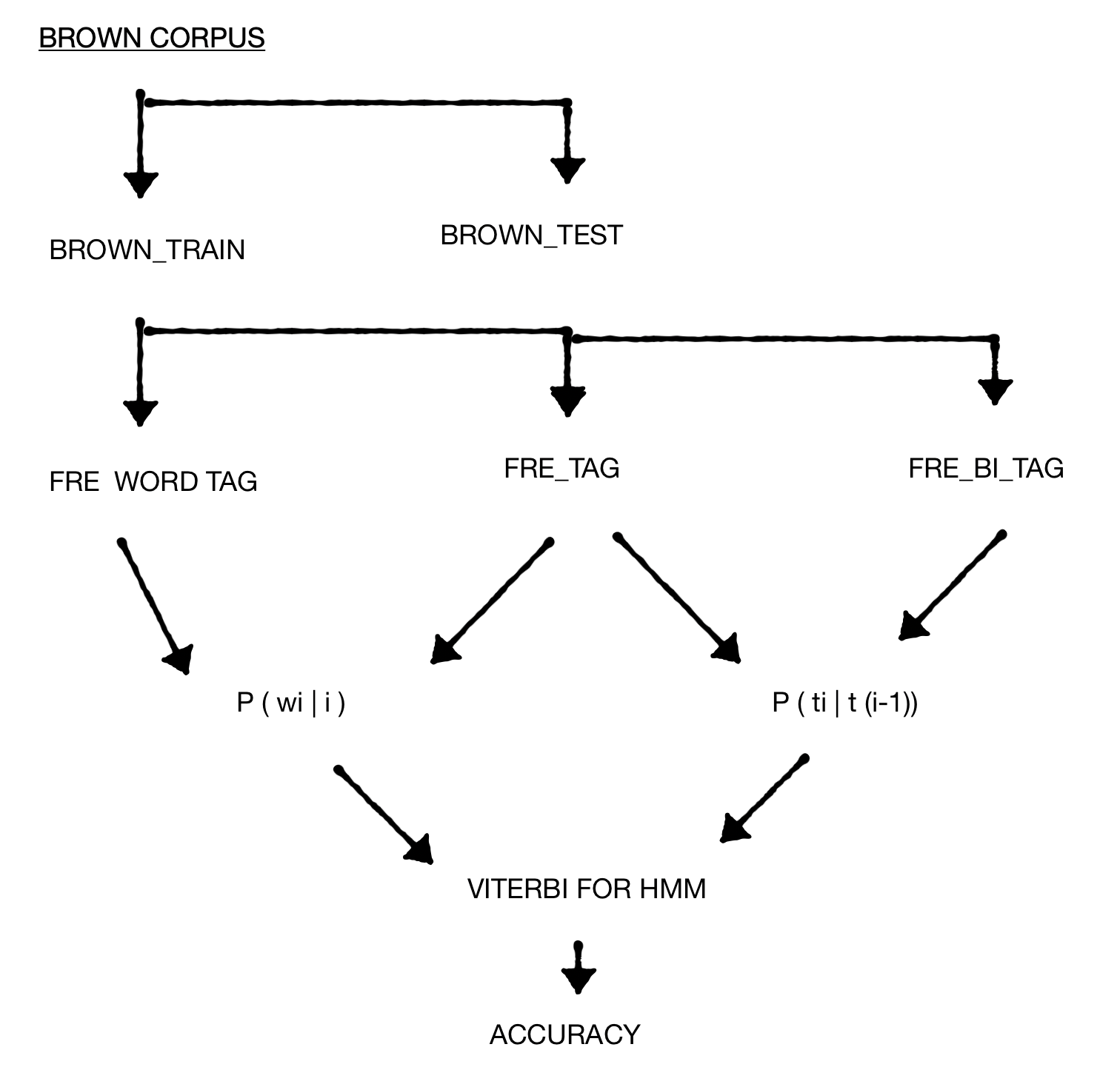
<p><img src="https://pratik-ingle.github.io/images/hmm-procedure.png" class="img-fluid" alt="Flow of the HMM tagger: split corpus, count frequencies, compute probabilities, run Viterbi, evaluate."></p>
<section id="split-the-corpus" class="level3">
<h3 class="anchored" data-anchor-id="split-the-corpus">1. Split the corpus</h3>
<p>Insert start <code>&lt;s&gt;</code> and end <code>&lt;\s&gt;</code> symbols in each sentence, then hold out the first 10 sentences for testing.</p>
<div class="sourceCode" id="cb1" style="background: #f1f3f5;"><pre class="sourceCode python code-with-copy"><code class="sourceCode python"><span id="cb1-1"><span class="im" style="color: #00769E;">from</span> nltk.corpus <span class="im" style="color: #00769E;">import</span> brown</span>
<span id="cb1-2"></span>
<span id="cb1-3">p <span class="op" style="color: #5E5E5E;">=</span> brown.tagged_sents()</span>
<span id="cb1-4">brown_corpus <span class="op" style="color: #5E5E5E;">=</span> []</span>
<span id="cb1-5"><span class="cf" style="color: #003B4F;">for</span> i <span class="kw" style="color: #003B4F;">in</span> p:</span>
<span id="cb1-6">    i.insert(<span class="dv" style="color: #AD0000;">0</span>, (<span class="st" style="color: #20794D;">'&lt;s&gt;'</span>, <span class="st" style="color: #20794D;">'&lt;s&gt;'</span>))</span>
<span id="cb1-7">    i.insert(<span class="bu" style="color: null;">len</span>(i), (<span class="st" style="color: #20794D;">'&lt;</span><span class="ch" style="color: #20794D;">\\</span><span class="st" style="color: #20794D;">s&gt;'</span>, <span class="st" style="color: #20794D;">'&lt;</span><span class="ch" style="color: #20794D;">\\</span><span class="st" style="color: #20794D;">s&gt;'</span>))</span>
<span id="cb1-8">    brown_corpus.append(i)</span>
<span id="cb1-9"></span>
<span id="cb1-10">brown_test <span class="op" style="color: #5E5E5E;">=</span> []</span>
<span id="cb1-11">brown_train <span class="op" style="color: #5E5E5E;">=</span> []</span>
<span id="cb1-12">sen <span class="op" style="color: #5E5E5E;">=</span> <span class="dv" style="color: #AD0000;">0</span></span>
<span id="cb1-13"><span class="cf" style="color: #003B4F;">for</span> i <span class="kw" style="color: #003B4F;">in</span> brown_corpus:</span>
<span id="cb1-14">    sen <span class="op" style="color: #5E5E5E;">+=</span> <span class="dv" style="color: #AD0000;">1</span></span>
<span id="cb1-15">    <span class="cf" style="color: #003B4F;">if</span> sen <span class="op" style="color: #5E5E5E;">&lt;=</span> <span class="dv" style="color: #AD0000;">10</span>:</span>
<span id="cb1-16">        brown_test.append(i)</span>
<span id="cb1-17">    <span class="cf" style="color: #003B4F;">else</span>:</span>
<span id="cb1-18">        brown_train.append(i)</span></code></pre></div>
</section>
<section id="count-patterns-in-the-training-set" class="level3">
<h3 class="anchored" data-anchor-id="count-patterns-in-the-training-set">2. Count patterns in the training set</h3>
<p>We need three frequency tables:</p>
<ul>
<li><code>fre_wordtag</code>: frequency of each (word, tag) pair</li>
<li><code>fre_tag</code>: frequency of each tag</li>
<li><code>fre_bi_tag</code>: frequency of each tag given its previous tag</li>
</ul>
<div class="sourceCode" id="cb2" style="background: #f1f3f5;"><pre class="sourceCode python code-with-copy"><code class="sourceCode python"><span id="cb2-1"><span class="im" style="color: #00769E;">from</span> collections <span class="im" style="color: #00769E;">import</span> Counter</span>
<span id="cb2-2"></span>
<span id="cb2-3"><span class="kw" style="color: #003B4F;">def</span> fre(x):</span>
<span id="cb2-4">    types <span class="op" style="color: #5E5E5E;">=</span> Counter(<span class="bu" style="color: null;">tuple</span>(item) <span class="cf" style="color: #003B4F;">for</span> item <span class="kw" style="color: #003B4F;">in</span> x)</span>
<span id="cb2-5">    freq <span class="op" style="color: #5E5E5E;">=</span> <span class="bu" style="color: null;">list</span>(types.items())</span>
<span id="cb2-6">    freq.sort(key<span class="op" style="color: #5E5E5E;">=</span><span class="kw" style="color: #003B4F;">lambda</span> f: f[<span class="dv" style="color: #AD0000;">1</span>], reverse<span class="op" style="color: #5E5E5E;">=</span><span class="va" style="color: #111111;">True</span>)</span>
<span id="cb2-7">    <span class="cf" style="color: #003B4F;">return</span> freq</span>
<span id="cb2-8"></span>
<span id="cb2-9"><span class="co" style="color: #5E5E5E;"># flatten training sentences into (word, tag) pairs</span></span>
<span id="cb2-10">brown_words_tag <span class="op" style="color: #5E5E5E;">=</span> [j <span class="cf" style="color: #003B4F;">for</span> i <span class="kw" style="color: #003B4F;">in</span> brown_train <span class="cf" style="color: #003B4F;">for</span> j <span class="kw" style="color: #003B4F;">in</span> i]</span>
<span id="cb2-11">fre_wordtag <span class="op" style="color: #5E5E5E;">=</span> fre(brown_words_tag)</span>
<span id="cb2-12"></span>
<span id="cb2-13"><span class="co" style="color: #5E5E5E;"># tag frequencies</span></span>
<span id="cb2-14">brown_tag <span class="op" style="color: #5E5E5E;">=</span> [j[<span class="dv" style="color: #AD0000;">1</span>] <span class="cf" style="color: #003B4F;">for</span> i <span class="kw" style="color: #003B4F;">in</span> brown_train <span class="cf" style="color: #003B4F;">for</span> j <span class="kw" style="color: #003B4F;">in</span> i]</span>
<span id="cb2-15">fre_tag <span class="op" style="color: #5E5E5E;">=</span> <span class="bu" style="color: null;">list</span>(Counter(brown_tag).items())</span>
<span id="cb2-16">fre_tag.sort(key<span class="op" style="color: #5E5E5E;">=</span><span class="kw" style="color: #003B4F;">lambda</span> f: f[<span class="dv" style="color: #AD0000;">1</span>], reverse<span class="op" style="color: #5E5E5E;">=</span><span class="va" style="color: #111111;">True</span>)</span></code></pre></div>
</section>
<section id="turn-counts-into-probabilities" class="level3">
<h3 class="anchored" data-anchor-id="turn-counts-into-probabilities">3. Turn counts into probabilities</h3>
<p>Emission probabilities <img src="https://latex.codecogs.com/png.latex?P(w_i%20%5Cmid%20t_i)%20=%20C(t_i,%20w_i)%20/%20C(t_i)">:</p>
<div class="sourceCode" id="cb3" style="background: #f1f3f5;"><pre class="sourceCode python code-with-copy"><code class="sourceCode python"><span id="cb3-1">probWiti <span class="op" style="color: #5E5E5E;">=</span> []</span>
<span id="cb3-2"><span class="cf" style="color: #003B4F;">for</span> i <span class="kw" style="color: #003B4F;">in</span> fre_wordtag:</span>
<span id="cb3-3">    <span class="cf" style="color: #003B4F;">for</span> j <span class="kw" style="color: #003B4F;">in</span> fre_tag:</span>
<span id="cb3-4">        <span class="cf" style="color: #003B4F;">if</span> i[<span class="dv" style="color: #AD0000;">0</span>][<span class="dv" style="color: #AD0000;">1</span>] <span class="op" style="color: #5E5E5E;">==</span> j[<span class="dv" style="color: #AD0000;">0</span>]:</span>
<span id="cb3-5">            probWiti.append([i[<span class="dv" style="color: #AD0000;">0</span>], i[<span class="dv" style="color: #AD0000;">1</span>] <span class="op" style="color: #5E5E5E;">/</span> j[<span class="dv" style="color: #AD0000;">1</span>]])</span></code></pre></div>
<p>Transition probabilities <img src="https://latex.codecogs.com/png.latex?P(t_i%20%5Cmid%20t_%7Bi-1%7D)%20=%20C(t_%7Bi-1%7D,%20t_i)%20/%20C(t_%7Bi-1%7D)">, built from tag bigrams (skipping the <code>&lt;\s&gt;</code> → <code>&lt;s&gt;</code> sentence boundary):</p>
<div class="sourceCode" id="cb4" style="background: #f1f3f5;"><pre class="sourceCode python code-with-copy"><code class="sourceCode python"><span id="cb4-1">bi_tag <span class="op" style="color: #5E5E5E;">=</span> []</span>
<span id="cb4-2">x <span class="op" style="color: #5E5E5E;">=</span> <span class="bu" style="color: null;">len</span>(brown_words_tag)</span>
<span id="cb4-3"><span class="cf" style="color: #003B4F;">for</span> j <span class="kw" style="color: #003B4F;">in</span> <span class="bu" style="color: null;">range</span>(x <span class="op" style="color: #5E5E5E;">-</span> <span class="dv" style="color: #AD0000;">1</span>):</span>
<span id="cb4-4">    temp <span class="op" style="color: #5E5E5E;">=</span> [brown_words_tag[j][<span class="dv" style="color: #AD0000;">1</span>], brown_words_tag[j <span class="op" style="color: #5E5E5E;">+</span> <span class="dv" style="color: #AD0000;">1</span>][<span class="dv" style="color: #AD0000;">1</span>]]</span>
<span id="cb4-5">    <span class="cf" style="color: #003B4F;">if</span> temp <span class="op" style="color: #5E5E5E;">!=</span> [<span class="st" style="color: #20794D;">'&lt;</span><span class="ch" style="color: #20794D;">\\</span><span class="st" style="color: #20794D;">s&gt;'</span>, <span class="st" style="color: #20794D;">'&lt;s&gt;'</span>]:</span>
<span id="cb4-6">        bi_tag.append(temp)</span>
<span id="cb4-7"></span>
<span id="cb4-8">fre_bi_tag <span class="op" style="color: #5E5E5E;">=</span> fre(bi_tag)</span>
<span id="cb4-9"></span>
<span id="cb4-10">probbitag <span class="op" style="color: #5E5E5E;">=</span> []</span>
<span id="cb4-11"><span class="cf" style="color: #003B4F;">for</span> i <span class="kw" style="color: #003B4F;">in</span> fre_bi_tag:</span>
<span id="cb4-12">    <span class="cf" style="color: #003B4F;">for</span> j <span class="kw" style="color: #003B4F;">in</span> fre_tag:</span>
<span id="cb4-13">        <span class="cf" style="color: #003B4F;">if</span> i[<span class="dv" style="color: #AD0000;">0</span>][<span class="dv" style="color: #AD0000;">0</span>] <span class="op" style="color: #5E5E5E;">==</span> j[<span class="dv" style="color: #AD0000;">0</span>]:</span>
<span id="cb4-14">            probbitag.append([i[<span class="dv" style="color: #AD0000;">0</span>], i[<span class="dv" style="color: #AD0000;">1</span>] <span class="op" style="color: #5E5E5E;">/</span> j[<span class="dv" style="color: #AD0000;">1</span>]])</span></code></pre></div>
<p>The set of all tags seen in training is simply:</p>
<div class="sourceCode" id="cb5" style="background: #f1f3f5;"><pre class="sourceCode python code-with-copy"><code class="sourceCode python"><span id="cb5-1">pos_tag <span class="op" style="color: #5E5E5E;">=</span> [i[<span class="dv" style="color: #AD0000;">0</span>] <span class="cf" style="color: #003B4F;">for</span> i <span class="kw" style="color: #003B4F;">in</span> fre_tag]</span></code></pre></div>
<p>Because a word’s probability depends on its tag and a tag’s probability depends on the previous tag, there is no <code>UNK</code> tag in the tagger itself; unknown words are handled separately below.</p>
</section>
<section id="viterbi-decoding" class="level3">
<h3 class="anchored" data-anchor-id="viterbi-decoding">4. Viterbi decoding</h3>
<p>With the probabilities in hand we build, for one test sentence, an emission lattice (only entries with non-zero emission probability, since a zero would zero out the whole path) and the set of transition probabilities among the tags that sentence can take.</p>
<div class="sourceCode" id="cb6" style="background: #f1f3f5;"><pre class="sourceCode python code-with-copy"><code class="sourceCode python"><span id="cb6-1">sentance <span class="op" style="color: #5E5E5E;">=</span> brown_test[<span class="dv" style="color: #AD0000;">4</span>]   <span class="co" style="color: #5E5E5E;"># pick any of the first 10 test sentences</span></span>
<span id="cb6-2">l <span class="op" style="color: #5E5E5E;">=</span> <span class="bu" style="color: null;">len</span>(sentance)</span>
<span id="cb6-3"></span>
<span id="cb6-4">lattic_emission <span class="op" style="color: #5E5E5E;">=</span> [[] <span class="cf" style="color: #003B4F;">for</span> _ <span class="kw" style="color: #003B4F;">in</span> <span class="bu" style="color: null;">range</span>(l)]</span>
<span id="cb6-5">sen_tag <span class="op" style="color: #5E5E5E;">=</span> []</span>
<span id="cb6-6"><span class="cf" style="color: #003B4F;">for</span> i <span class="kw" style="color: #003B4F;">in</span> <span class="bu" style="color: null;">range</span>(l):</span>
<span id="cb6-7">    <span class="cf" style="color: #003B4F;">for</span> j <span class="kw" style="color: #003B4F;">in</span> probWiti:</span>
<span id="cb6-8">        <span class="cf" style="color: #003B4F;">if</span> sentance[i][<span class="dv" style="color: #AD0000;">0</span>] <span class="op" style="color: #5E5E5E;">==</span> j[<span class="dv" style="color: #AD0000;">0</span>][<span class="dv" style="color: #AD0000;">0</span>]:</span>
<span id="cb6-9">            lattic_emission[i].append(j)</span>
<span id="cb6-10">            <span class="cf" style="color: #003B4F;">if</span> j[<span class="dv" style="color: #AD0000;">0</span>][<span class="dv" style="color: #AD0000;">1</span>] <span class="kw" style="color: #003B4F;">not</span> <span class="kw" style="color: #003B4F;">in</span> sen_tag:</span>
<span id="cb6-11">                sen_tag.append(j[<span class="dv" style="color: #AD0000;">0</span>][<span class="dv" style="color: #AD0000;">1</span>])</span>
<span id="cb6-12">    <span class="cf" style="color: #003B4F;">if</span> <span class="bu" style="color: null;">len</span>(lattic_emission[i]) <span class="op" style="color: #5E5E5E;">==</span> <span class="dv" style="color: #AD0000;">0</span>:</span>
<span id="cb6-13">        <span class="co" style="color: #5E5E5E;"># unknown word: treat as 'NN' with probability 0.11</span></span>
<span id="cb6-14">        lattic_emission[i].append([(sentance[i][<span class="dv" style="color: #AD0000;">0</span>], <span class="st" style="color: #20794D;">'NN'</span>), <span class="fl" style="color: #AD0000;">0.11</span>])</span>
<span id="cb6-15"></span>
<span id="cb6-16"><span class="co" style="color: #5E5E5E;"># transition probabilities restricted to tags that appear in this sentence</span></span>
<span id="cb6-17">tran_tag <span class="op" style="color: #5E5E5E;">=</span> [(i, j) <span class="cf" style="color: #003B4F;">for</span> i <span class="kw" style="color: #003B4F;">in</span> sen_tag <span class="cf" style="color: #003B4F;">for</span> j <span class="kw" style="color: #003B4F;">in</span> sen_tag]</span>
<span id="cb6-18">tran_pro <span class="op" style="color: #5E5E5E;">=</span> [j <span class="cf" style="color: #003B4F;">for</span> i <span class="kw" style="color: #003B4F;">in</span> tran_tag <span class="cf" style="color: #003B4F;">for</span> j <span class="kw" style="color: #003B4F;">in</span> probbitag <span class="cf" style="color: #003B4F;">if</span> i <span class="op" style="color: #5E5E5E;">==</span> j[<span class="dv" style="color: #AD0000;">0</span>]]</span>
<span id="cb6-19"></span>
<span id="cb6-20"><span class="co" style="color: #5E5E5E;"># keep the highest-emission tag for each word, then chain transitions</span></span>
<span id="cb6-21">max_emission <span class="op" style="color: #5E5E5E;">=</span> []</span>
<span id="cb6-22">sequence <span class="op" style="color: #5E5E5E;">=</span> []</span>
<span id="cb6-23"><span class="cf" style="color: #003B4F;">for</span> i <span class="kw" style="color: #003B4F;">in</span> lattic_emission:</span>
<span id="cb6-24">    i.sort(key<span class="op" style="color: #5E5E5E;">=</span><span class="kw" style="color: #003B4F;">lambda</span> e: e[<span class="dv" style="color: #AD0000;">1</span>], reverse<span class="op" style="color: #5E5E5E;">=</span><span class="va" style="color: #111111;">True</span>)</span>
<span id="cb6-25">    max_emission.append(i)</span>
<span id="cb6-26"></span>
<span id="cb6-27">vi <span class="op" style="color: #5E5E5E;">=</span> []</span>
<span id="cb6-28"><span class="cf" style="color: #003B4F;">for</span> i <span class="kw" style="color: #003B4F;">in</span> <span class="bu" style="color: null;">range</span>(<span class="bu" style="color: null;">len</span>(max_emission) <span class="op" style="color: #5E5E5E;">-</span> <span class="dv" style="color: #AD0000;">1</span>):</span>
<span id="cb6-29">    vi.append((max_emission[i][<span class="dv" style="color: #AD0000;">0</span>][<span class="dv" style="color: #AD0000;">0</span>][<span class="dv" style="color: #AD0000;">1</span>], max_emission[i <span class="op" style="color: #5E5E5E;">+</span> <span class="dv" style="color: #AD0000;">1</span>][<span class="dv" style="color: #AD0000;">0</span>][<span class="dv" style="color: #AD0000;">0</span>][<span class="dv" style="color: #AD0000;">1</span>]))</span>
<span id="cb6-30">    sequence.append(max_emission[i][<span class="dv" style="color: #AD0000;">0</span>][<span class="dv" style="color: #AD0000;">0</span>])</span>
<span id="cb6-31">sequence.append((<span class="st" style="color: #20794D;">'&lt;</span><span class="ch" style="color: #20794D;">\\</span><span class="st" style="color: #20794D;">s&gt;'</span>, <span class="st" style="color: #20794D;">'&lt;</span><span class="ch" style="color: #20794D;">\\</span><span class="st" style="color: #20794D;">s&gt;'</span>))</span>
<span id="cb6-32"></span>
<span id="cb6-33">Vj <span class="op" style="color: #5E5E5E;">=</span> []</span>
<span id="cb6-34"><span class="cf" style="color: #003B4F;">for</span> i <span class="kw" style="color: #003B4F;">in</span> <span class="bu" style="color: null;">range</span>(<span class="bu" style="color: null;">len</span>(vi)):</span>
<span id="cb6-35">    <span class="cf" style="color: #003B4F;">for</span> j <span class="kw" style="color: #003B4F;">in</span> tran_pro:</span>
<span id="cb6-36">        <span class="cf" style="color: #003B4F;">if</span> vi[i] <span class="op" style="color: #5E5E5E;">==</span> j[<span class="dv" style="color: #AD0000;">0</span>]:</span>
<span id="cb6-37">            Vj.append(max_emission[i][<span class="dv" style="color: #AD0000;">0</span>][<span class="dv" style="color: #AD0000;">1</span>] <span class="op" style="color: #5E5E5E;">*</span> j[<span class="dv" style="color: #AD0000;">1</span>])</span>
<span id="cb6-38"></span>
<span id="cb6-39"><span class="kw" style="color: #003B4F;">def</span> viterbi(Vj):</span>
<span id="cb6-40">    result <span class="op" style="color: #5E5E5E;">=</span> <span class="dv" style="color: #AD0000;">1</span></span>
<span id="cb6-41">    <span class="cf" style="color: #003B4F;">for</span> x <span class="kw" style="color: #003B4F;">in</span> Vj:</span>
<span id="cb6-42">        result <span class="op" style="color: #5E5E5E;">*=</span> x</span>
<span id="cb6-43">    <span class="cf" style="color: #003B4F;">return</span> result</span>
<span id="cb6-44"></span>
<span id="cb6-45"><span class="bu" style="color: null;">print</span>(sequence, <span class="st" style="color: #20794D;">'</span><span class="ch" style="color: #20794D;">\n</span><span class="st" style="color: #20794D;">'</span>, viterbi(Vj))</span></code></pre></div>
</section>
<section id="accuracy" class="level3">
<h3 class="anchored" data-anchor-id="accuracy">5. Accuracy</h3>
<div class="sourceCode" id="cb7" style="background: #f1f3f5;"><pre class="sourceCode python code-with-copy"><code class="sourceCode python"><span id="cb7-1">count <span class="op" style="color: #5E5E5E;">=</span> <span class="dv" style="color: #AD0000;">0</span></span>
<span id="cb7-2"><span class="cf" style="color: #003B4F;">for</span> i <span class="kw" style="color: #003B4F;">in</span> <span class="bu" style="color: null;">range</span>(<span class="bu" style="color: null;">len</span>(sentance)):</span>
<span id="cb7-3">    <span class="cf" style="color: #003B4F;">if</span> sentance[i] <span class="op" style="color: #5E5E5E;">==</span> sequence[i]:</span>
<span id="cb7-4">        count <span class="op" style="color: #5E5E5E;">+=</span> <span class="dv" style="color: #AD0000;">1</span></span>
<span id="cb7-5">accuracy <span class="op" style="color: #5E5E5E;">=</span> count <span class="op" style="color: #5E5E5E;">/</span> <span class="bu" style="color: null;">len</span>(sentance) <span class="op" style="color: #5E5E5E;">*</span> <span class="dv" style="color: #AD0000;">100</span></span>
<span id="cb7-6"><span class="bu" style="color: null;">print</span>(<span class="st" style="color: #20794D;">"accuracy of HMM tagger for given sentence is"</span>, accuracy)</span></code></pre></div>
</section>
</section>
<section id="results" class="level2">
<h2 class="anchored" data-anchor-id="results">Results</h2>
<p>For sentence 4 of the test set:</p>
<pre class="text"><code>[('&lt;s&gt;', '&lt;s&gt;'), ('The', 'AT-TL'), ('jury', 'NN-HL'), ('said', 'VBD'), ('it', 'PPS-HL'),
 ('did', 'DOD-NC'), ('find', 'VB'), ('that', 'WPS-NC'), ('many', 'AP-NC'), ('of', 'IN-TL'),
 ("Georgia's", 'NP
  <category>tutorials</category>
  <category>nlp</category>
  <category>HMM</category>
  <category>Viterbi</category>
  <guid>https://pratik-ingle.github.io/posts/tutorials/hmm-pos-tagger/index.html</guid>
  <pubDate>Sat, 30 Nov 2019 23:00:00 GMT</pubDate>
  <media:content url="https://pratik-ingle.github.io/images/hmm.png" medium="image" type="image/png" height="140" width="144"/>
</item>
</channel>
</rss>
), ('registration', 'NN'), ('and', 'CC-HL'), ('election', 'NN'),
 ('laws', 'NNS'), ('``', '``'), ('are', 'BER-HL'), ('outmoded', 'JJ'), ('or', 'CC-NC'),
 ('inadequate', 'JJ'), ('and', 'CC-HL'), ('often', 'RB'), ('ambiguous', 'JJ'), ("''", "''"),
 ('.', '.-HL'), ('&lt;\s&gt;', '&lt;\s&gt;')]
5.0121351597188597e-33
accuracy of HMM tagger for given sentence is
53.84615384615385</code></pre>
<p>Viterbi returns the most probable tag sequence with a sentence probability of about <img src="https://latex.codecogs.com/png.latex?5%20%5Ctimes%2010%5E%7B-33%7D">. Compared against the gold tags, accuracy on this sentence is only 53.8%, lower than the unigram and bigram taggers from earlier assignments. Two reasons: the Brown tagset is very fine-grained (phrase-level suffixes such as <code>-HL</code>, <code>-TL</code>, <code>-NC</code> split what would otherwise be one tag), and the corpus is case sensitive, so the same word gets different tags depending on capitalisation. The HMM does, however, do a better job at identifying phrases.</p>
</section>
<section id="unknown-words" class="level2">
<h2 class="anchored" data-anchor-id="unknown-words">Unknown words</h2>
<p>Words not seen in training are tagged <code>NN</code>, since most training words are nouns. In earlier assignments tagging everything as <code>NN</code> gave about 11% accuracy, so unknown words are given an emission probability of 0.11 in the Viterbi product.</p>
</section>
<section id="comparison-with-other-taggers" class="level2">
<h2 class="anchored" data-anchor-id="comparison-with-other-taggers">Comparison with other taggers</h2>
<p>Exhaustive HMM decoding is expensive: with <img src="https://latex.codecogs.com/png.latex?n"> tags and <img src="https://latex.codecogs.com/png.latex?m"> words there are <img src="https://latex.codecogs.com/png.latex?n%5Em"> tag sequences, which is why the Viterbi dynamic-programming algorithm is used to find the optimal one.</p>
<p>Like other stochastic taggers, an HMM tagger finds the most likely tag for a word or sequence of words. Unlike greedy taggers that tag one word at a time, the HMM tags a whole sentence at once, choosing the sequence that maximises</p>
<pre class="text"><code>P(word | tag) * P(tag | previous n tags)</code></pre>
<p>The HMM outperforms the simpler taggers here, but it is not the most accurate option: an interpolated tagger can do better.</p>
</section>
<section id="hmm-and-ambiguity" class="level2">
<h2 class="anchored" data-anchor-id="hmm-and-ambiguity">HMM and ambiguity</h2>
<p>Because the HMM considers the whole sentence, it can surface ambiguity: an ambiguous sentence gets different probabilities for its different tag sequences, and the most plausible reading is the one with the highest probability.</p>
</section>
<section id="further-work" class="level2">
<h2 class="anchored" data-anchor-id="further-work">Further work</h2>
<ul>
<li>Extend the transition model to depend on three or more previous tags (trigram or higher-order HMM).</li>
<li>Replace the count-based model with a neural sequence tagger.</li>
</ul>


</section>

 ]]></description>
  <category>tutorials</category>
  <category>nlp</category>
  <category>HMM</category>
  <category>Viterbi</category>
  <guid>https://pratik-ingle.github.io/posts/tutorials/hmm-pos-tagger/index.html</guid>
  <pubDate>Sat, 30 Nov 2019 23:00:00 GMT</pubDate>
  <media:content url="https://pratik-ingle.github.io/images/hmm.png" medium="image" type="image/png" height="140" width="144"/>
</item>
</channel>
</rss>